Install Pre-Release Core
In order to install the pre-release core, you need to decompress the supplied ArduinoCore-samd-newboards.zip in the hardware section of your sketchbook folder.
Sketchbook Folder Location
- Windows: This PC\Documents\Arduino
- Mac: $HOME/Documents/Arduino
- GNU/Linux: $HOME/Arduino
- Create a new folder
hardware/arduino-newin your sketchbook folder. If neither thehardwarenorarduino-newfolder exists, create them. - Uncompress the contents of
ArduinoCore-samd-newboards.zipin the previously created folder. - Rename the uncompressed folder
samd.
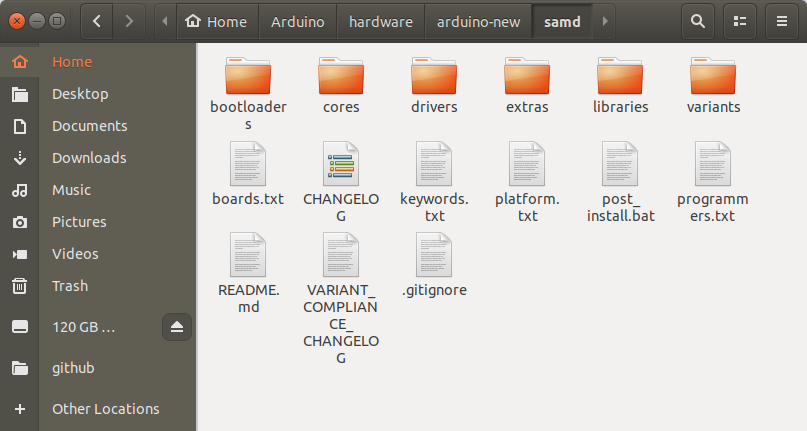
- Open the Arduino IDE and go to
Boards Managerto reload the index. - Select board
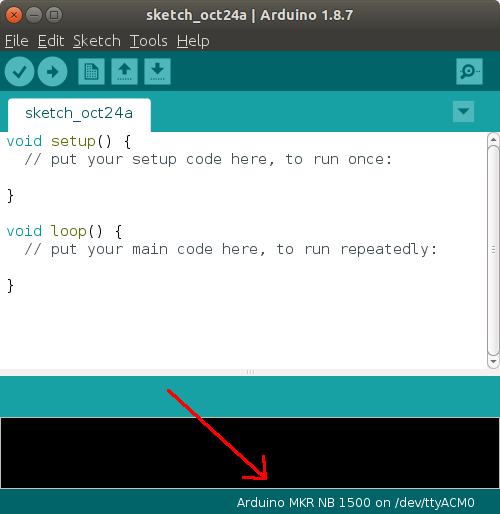
Arduino MKR NB 1500by going to Tools ⟶ Board ⟶ Arduino MKR NB 1500 - Verify that you’ve selected the correct board by looking in the bottom right corner of the IDE.